BACKGROUND
Airspace Driver Partner App
MY ROLE
Sr. Product Designer
MY CONTRIBUTION
Design Leadership
UX Research
Workshop Facilitation
UX/UI Design Direction
Design System Setup
Airspace 2022
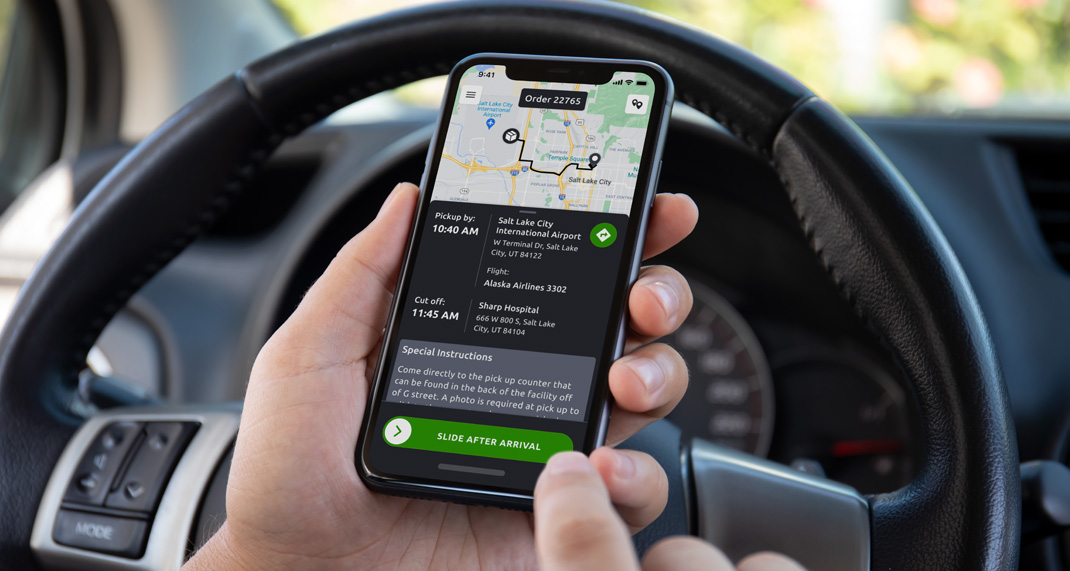
A gig based app for drivers to accept & complete time-critical delivery jobs
Airspace is an emerging tech logistics company providing clients with efficient routing for time-critical orders like human organ shipments. The operation team at Airspace is responsible for dealing with these critical orders and ensuring there are no service failures with the help of automated tasks via the internal platform.
Airspace’s Driver Partner App offers an experience for drivers using these automated tasks that helps drivers fulfill orders by efficiently completing the pick-up and delivery process.
What are Automated Tasks?
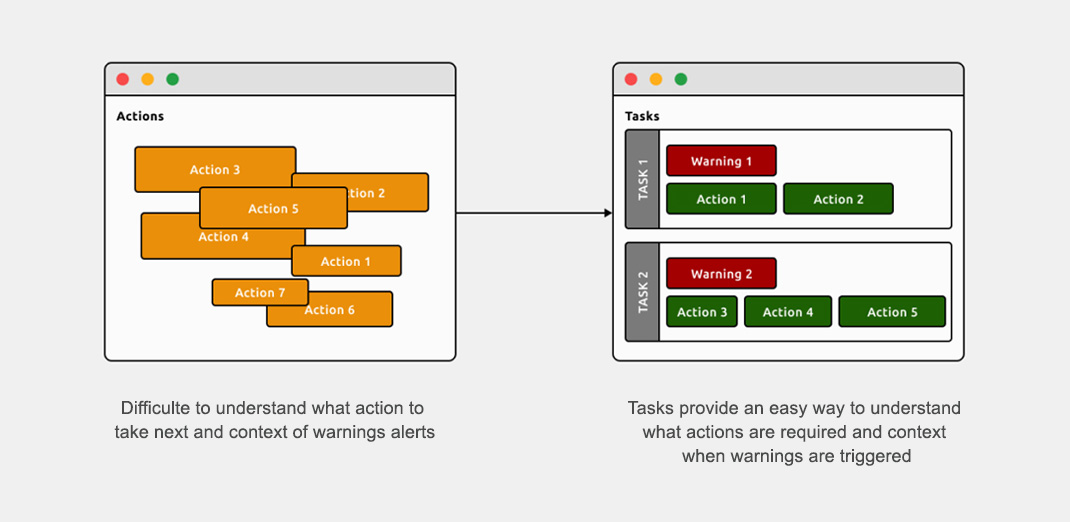
Working through high-priority orders isn’t easy as the operations team(Airspace) has to follow up with the drivers multiple times when the system generates automatic warnings. These follow-ups require much maintenance and do not work cohesively with these automated warnings. Therefore, introducing automated tasks provides a proactive approach to our operations team with a clear indication of what actions they need to take on any order.
What was the challenge?
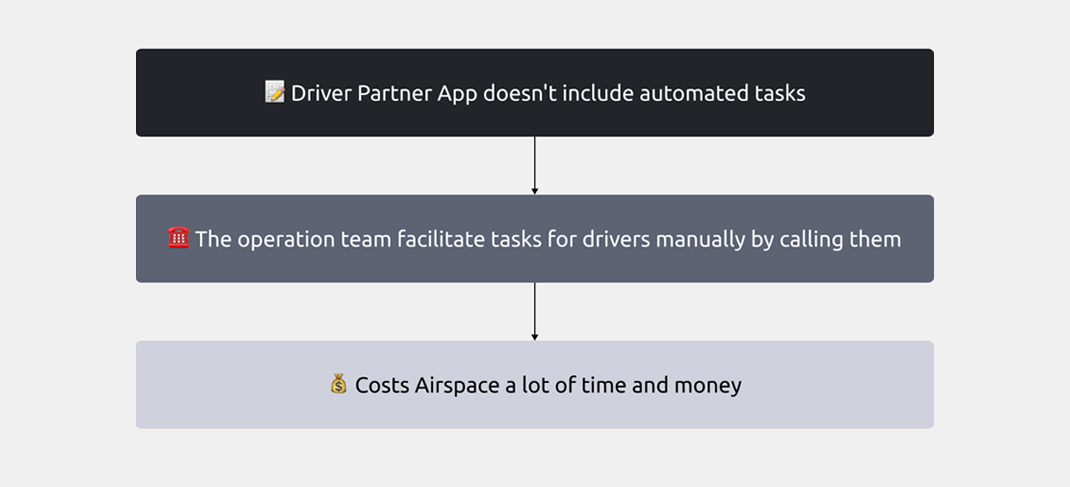
Drivers needed to take several steps when they were picking up and delivering packages with the Airspace driver app. But the app was rigid with a predefined step by step process. Because of this they could get stuck on a step before they could advance. This caused delays, confusion and overwhelmed the operations with in-bound calls during the fulfillment process.
THE SOLUTION
Concept
During our concept design phase, we collaboratively explored multiple solution ideas to build automated tasks within the Driver Partner app. With the help of our internal platform designers we ensured the flow aligned with the operations team’s platform and workflow. We defined the UX of this feature to produce concepts that focused on an easy-to-use step-by-step experience for our drivers.
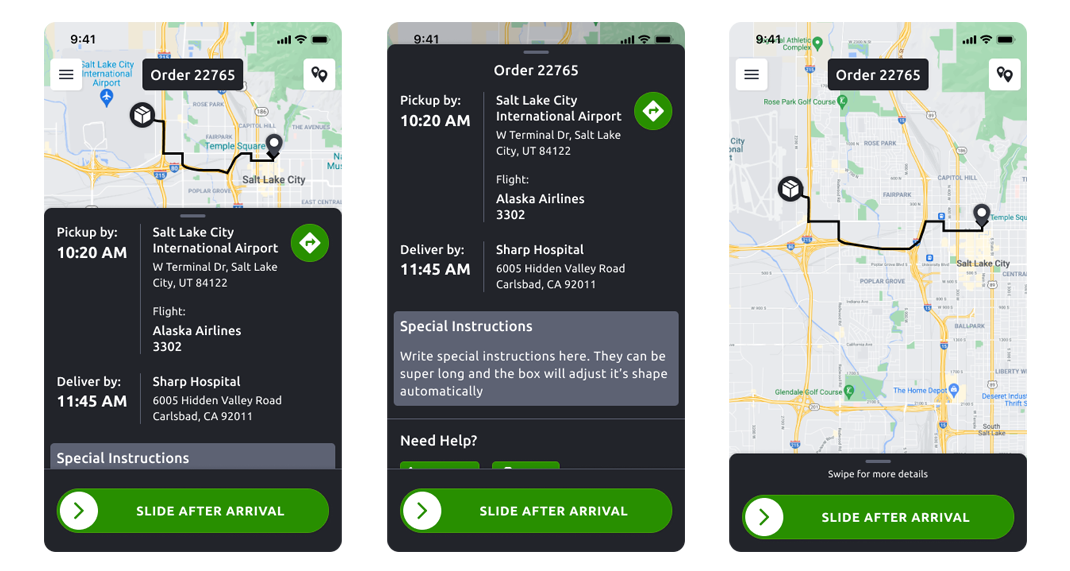
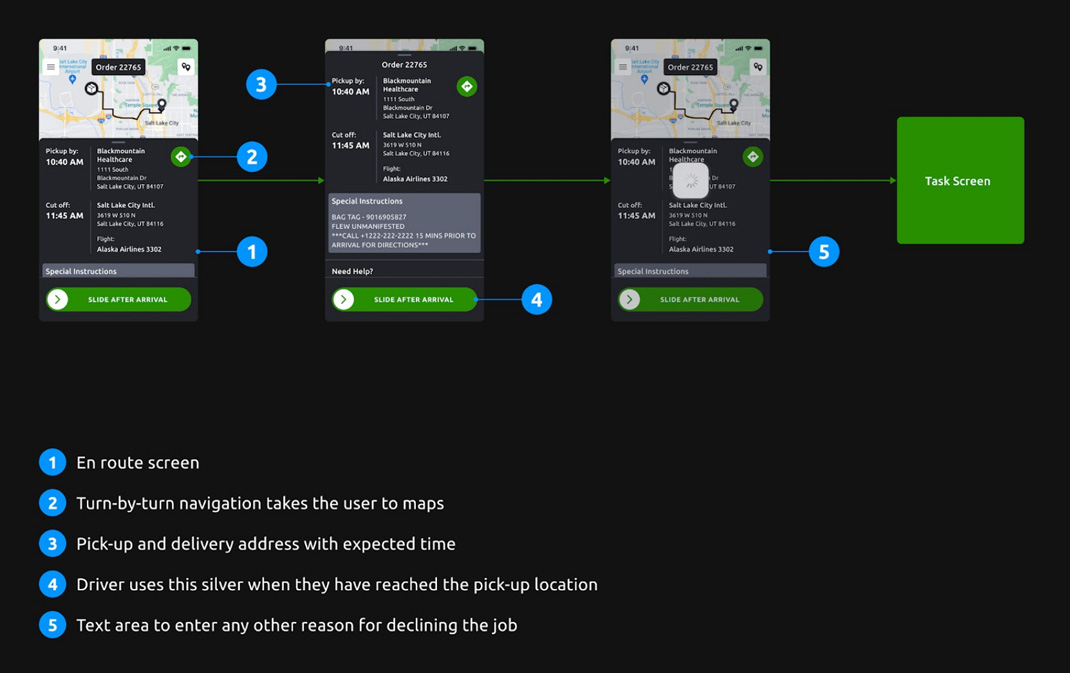
En Route Screen
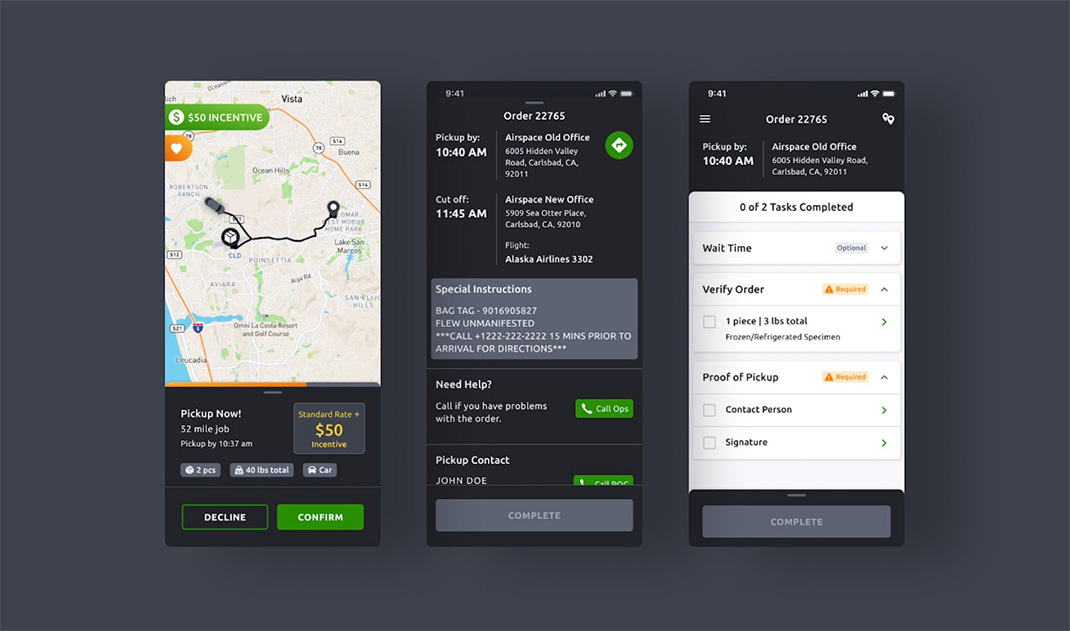
Drivers can quickly navigate to their pick-up location using the turn-by-turn navigation on this screen. An ubiquitous bottom sheet across the entire app provides drivers with all the essential information needed to complete an order.
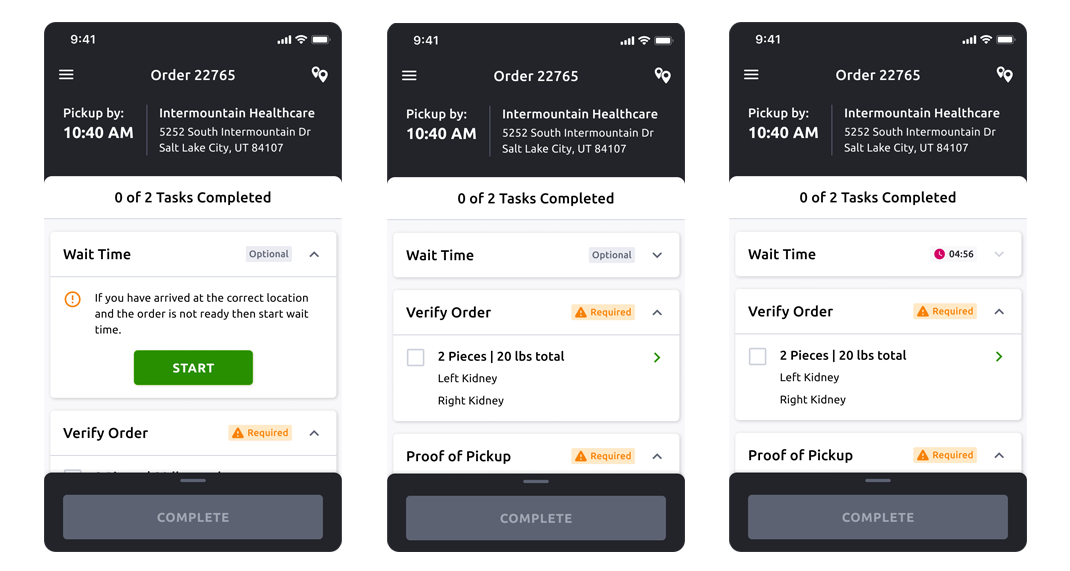
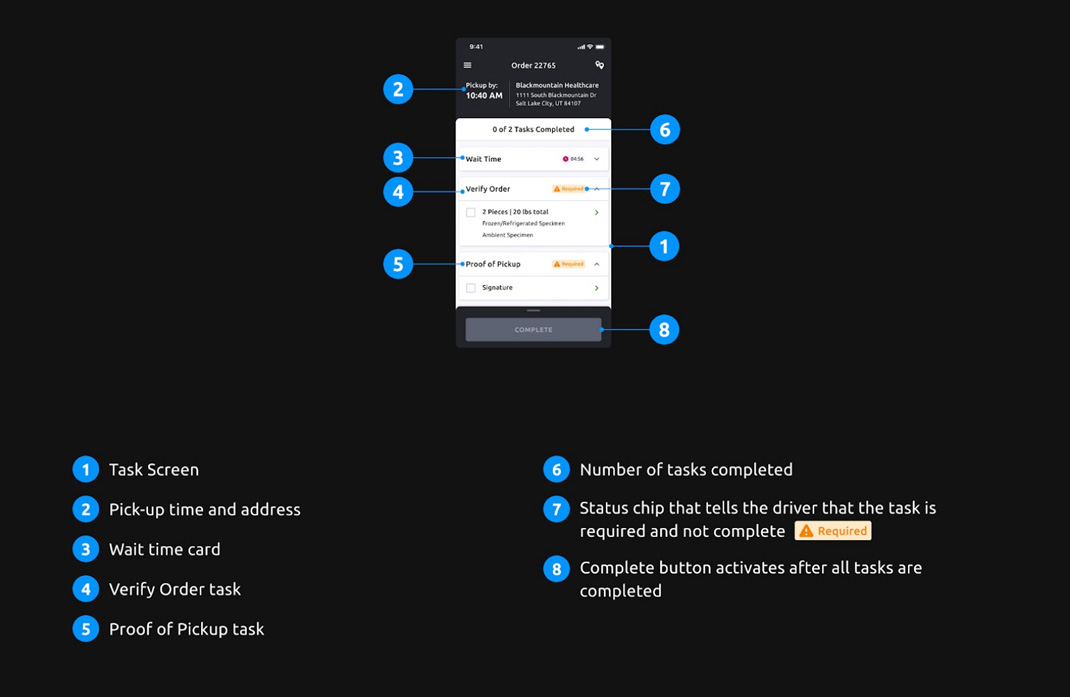
Task Screen
An index view of all the tasks a driver must complete on an order. It is a running list of tasks that can accommodate multiple use cases specific to a given order.
PROCESS
Research → Ideation → Design → Evaluation
As a team we went through the complete product design life-cycle from research to final design hand-off. I drafted a research plan that established the goals to ensure our understanding of the different needs of both the business and our drivers.
Research Goals
- Learn about automated tasks on the operation dashboard.
- Discover the problems the operation team faces because of the Driver Partner App’s incompatibility with tasks.
- Understand the current process drivers must go through when working on an order and the challenges they face.
- Learn factors that motivate them to work with us and why they lose motivation.
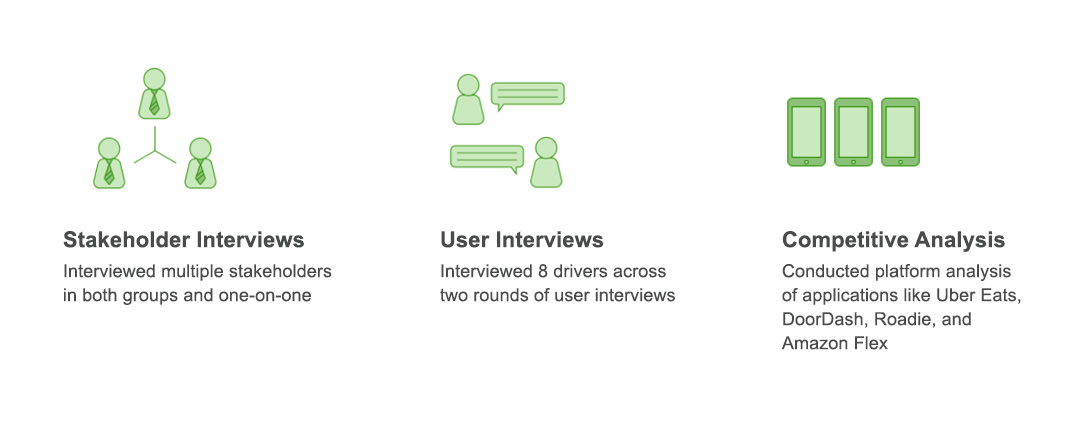
Methods
Research Learnings
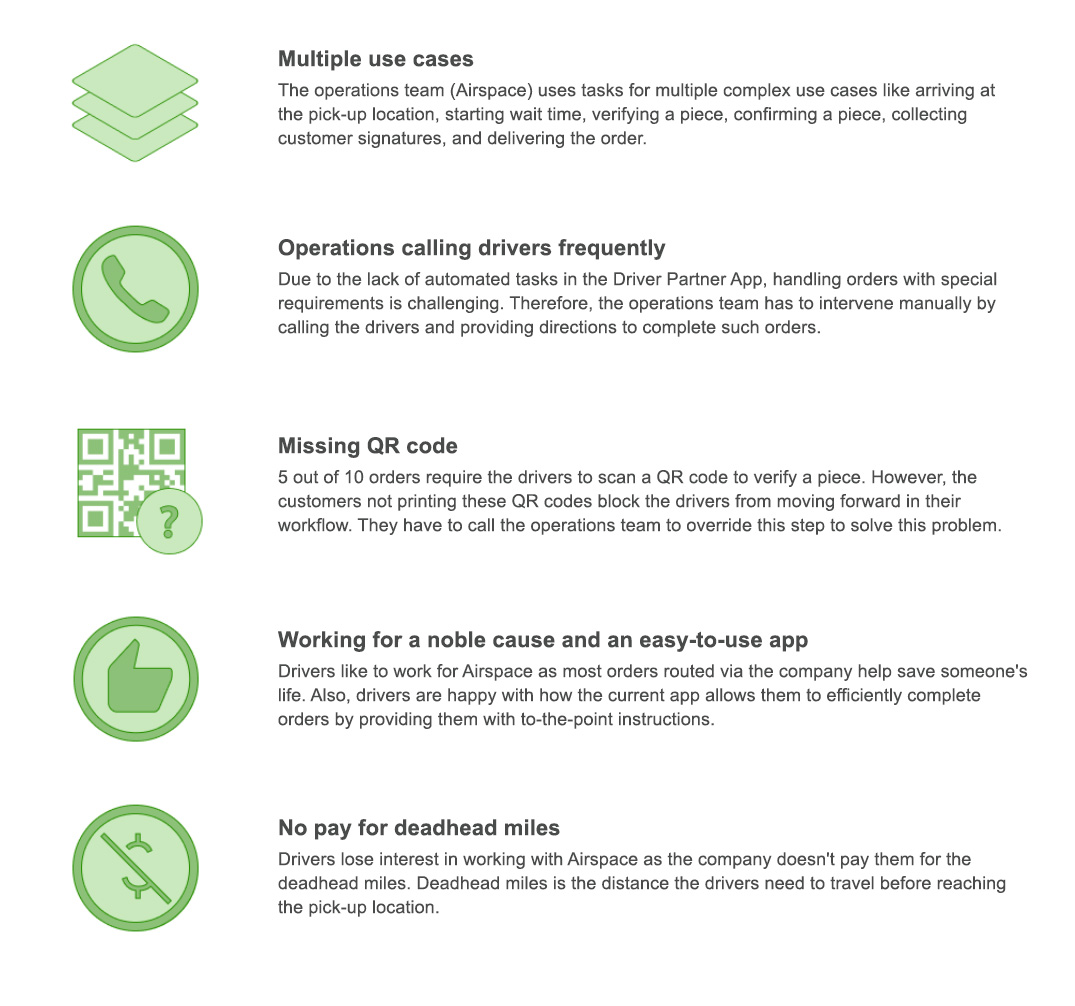
After completing our research, we identify the following 5 themes.
COLLABORATION
Ideation
With our research’s help, we could understand the existing problems that our drivers were facing in the Driver Partner App. These insights guided the design of an ideation workshop with our team and stakeholders, where we tried to sketch different ways of allowing the driver to complete the order checklist.
Defining Constraints
Making a modular app to accommodate future tasks.
Reason: The company plans to introduce more tasks in the future and wants to minimize the work to restructure the app to accommodate new tasks.
Excluding offer screen, job list, and order history screen.
Reason: Bringing tasks to the app was arduous for the team, so they wanted not to invest their time on other screens.
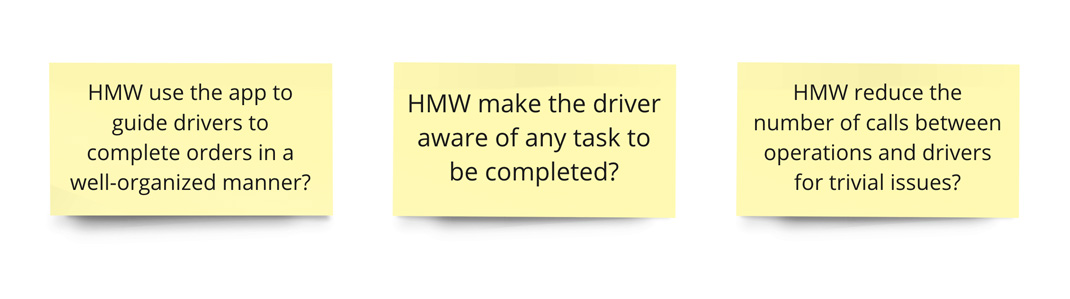
How Might We’s
We used some of the following how might we’s that allowed us to reframe our insights from research into opportunities to spark ideas.
Ideation Workshop
The team generated multiple ideas during this exercise. We needed to include use cases like arriving at the pick-up location, starting wait time, verifying a piece, confirming a piece, collecting customer signatures, and delivering the order.
The workshop was set up in three phases as shown below:
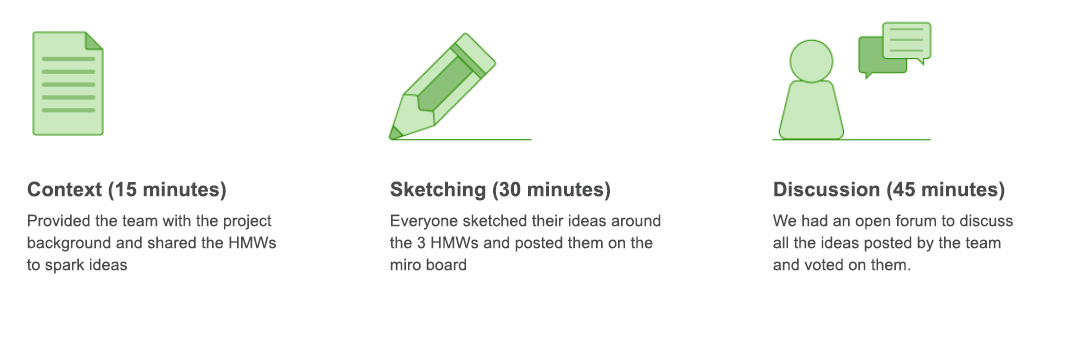
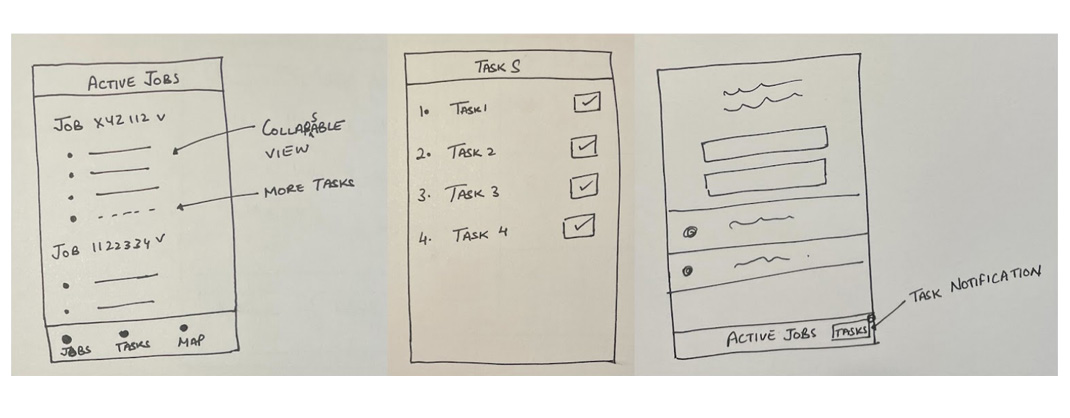
The workshop helped us identify 3 unique ideas for introducing automated tasks in the app.
- Bottom nav bar with jobs, tasks, map tabs for the drivers.
- Have all the tasks in collapsable cards.
- Provide drivers with a visual clue on the screen if there is a task.
UI PROCESS
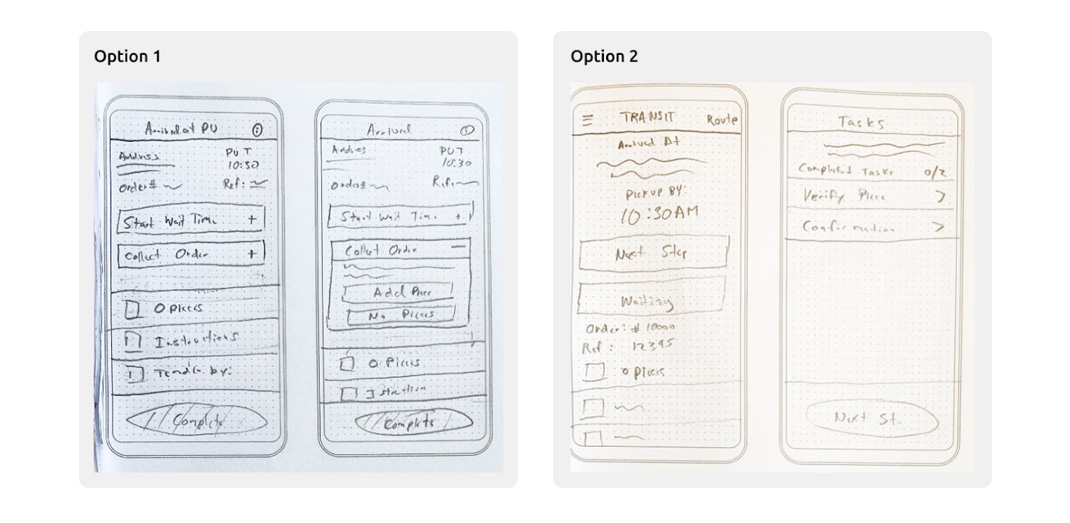
Initial Sketches
We sketched two different ideas where option 1 represented a collapsable card-like structure for all tasks on the home screen, and option 2 described tasks having their page separate from the home screen.
DEFINITION
App Flow with Multiple Order Use Cases
At Airspace we provide our clients with multiple options to ship their package with us. They can either print a QR code and put it on the package(most common use case) or use just the color of the label on the package. The diagram below represents all the possible cases that our drivers will encounter during the pick-up and delivery process.
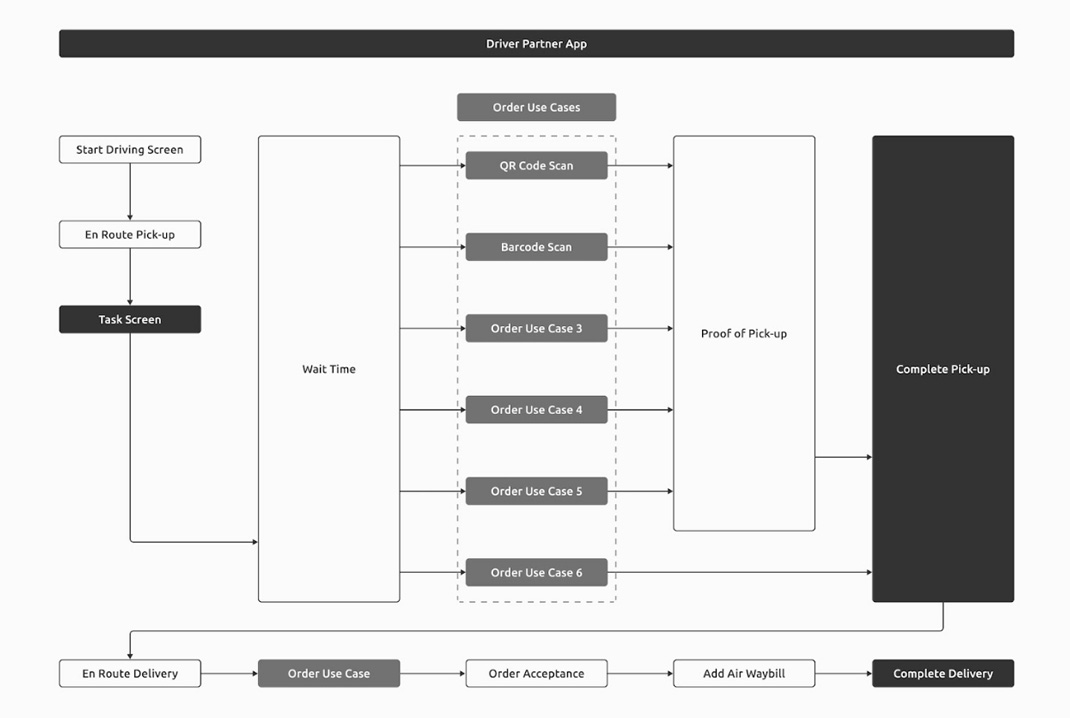
P.S: Tasks are highly modular and can be switched easily between different order use cases. Therefore, for the rest of the case study, I will focus on only one use case of QR codes.
User Flows
To better understand the user actions, we started with mapping out the user flows for pick-up and delivery.
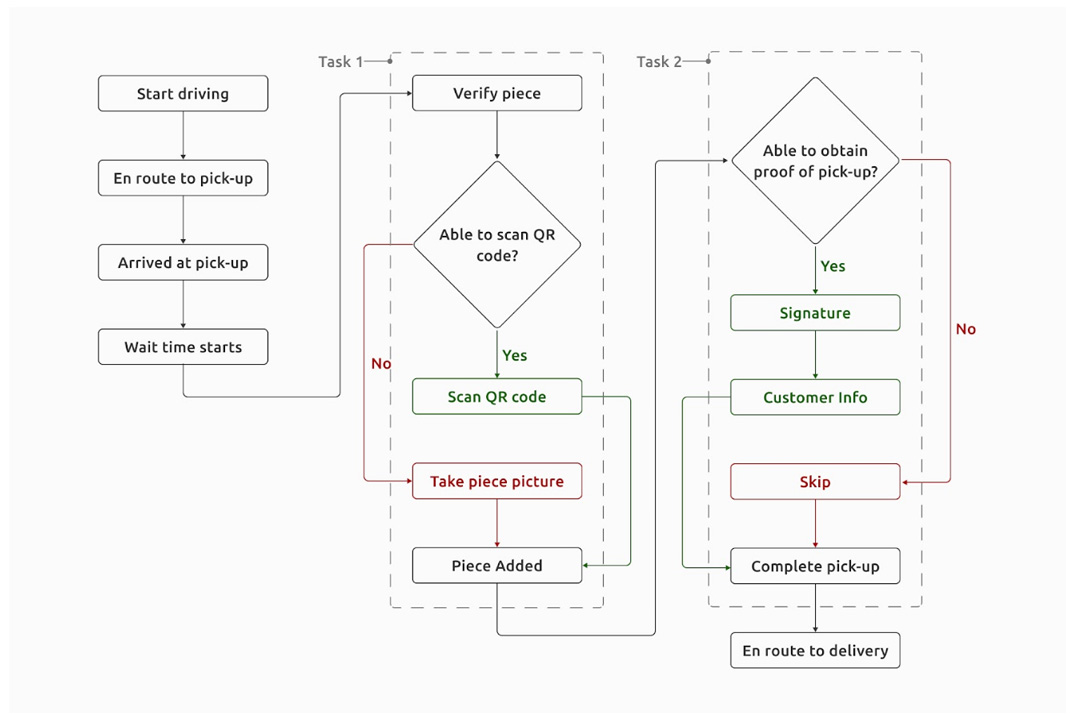
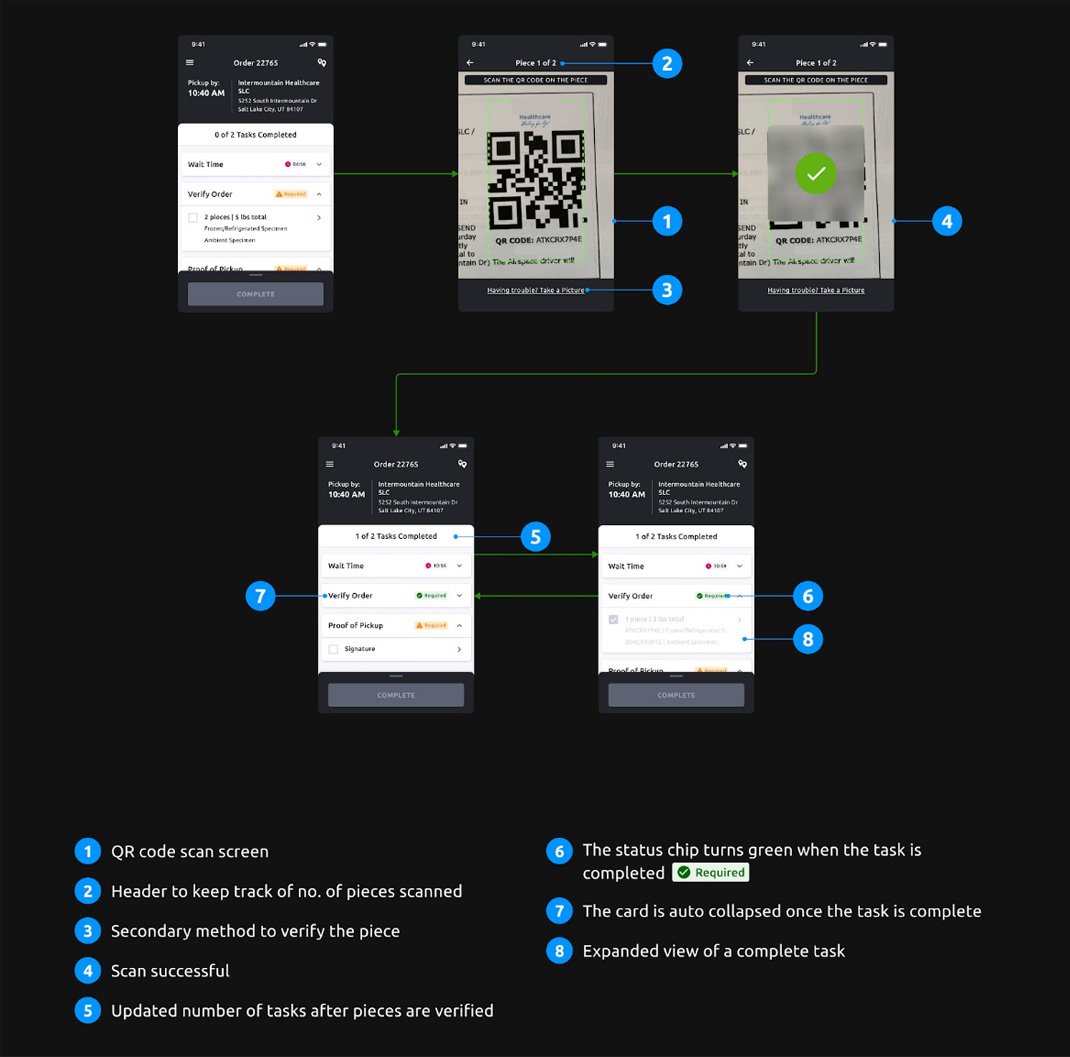
- Using QR code scan to verify pieces at pick-up.
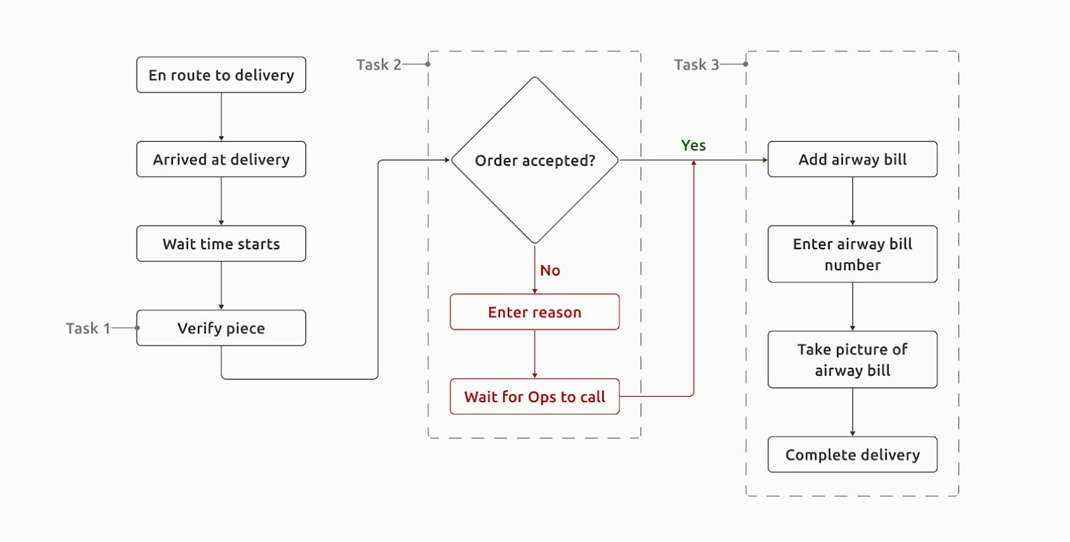
- Clients accepting the order on delivery.
DESIGN
Low-Fidelity Designs
Using the flow diagram we created these low fidelity mockups and share them with the design team and our drivers to get some quick feedback.
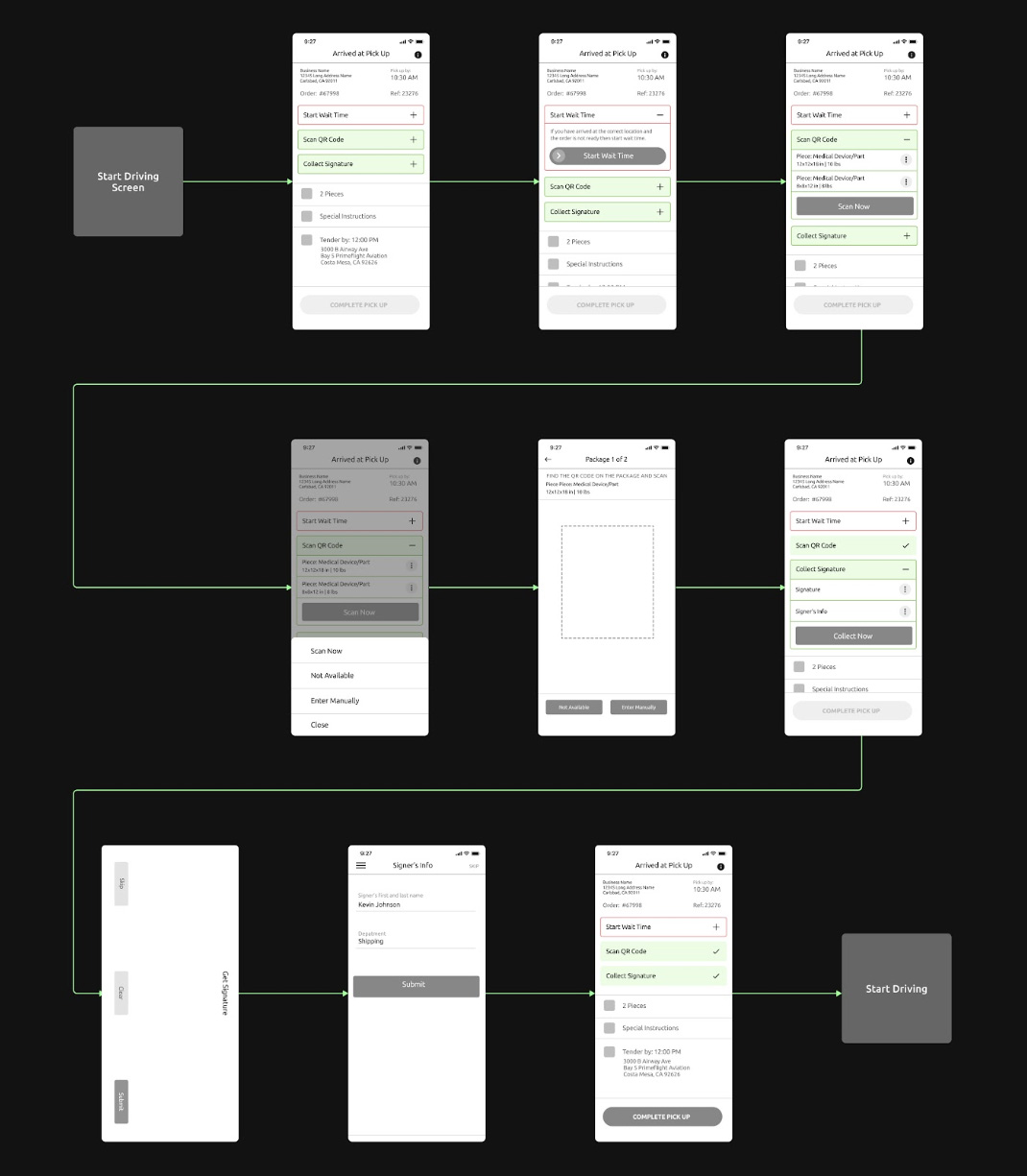
Learnings from Ideation
Understanding that all our users will be at hospitals and warehouse locations where the cellular reception is not best is essential. We need to provide drivers with all the information they would need in the app. We learned about the 3 fundamental problems drivers might face if we implemented these designs.
- Pick-up and delivery addresses are separated by tasks making it difficult for the drivers to discover the delivery address if there are more tasks or if it is a small mobile device.
- A button inside a task card adds another layer of complexity to the UI and makes the screen look cluttered.
- Using two patterns on the same screen, like cards and menu items, can lead to confusion.
Iteration
After iterating on the design team’s feedback, we created a high-fidelity design to test with our users. Our focus was to provide the app with a fresh look. Therefore, I contributed to building our design system in Figma and added new components required for this project.
Supporting automated tasks in the pick-up process
En route screen
- The En route screen allows drivers to quickly navigate to the pick-up location and see the order details by swiping up the bottom sheet. They can also confirm their arrival at the pick-up easily.
Tasks screen
- The task screen enables the drivers to access all the required tasks and attempt them in any order.
Verifying a piece
- Drivers can verify any piece easily in the app. The flow will guide the drivers on what to look for to scan a piece. The example below shows the QR code scanning process.
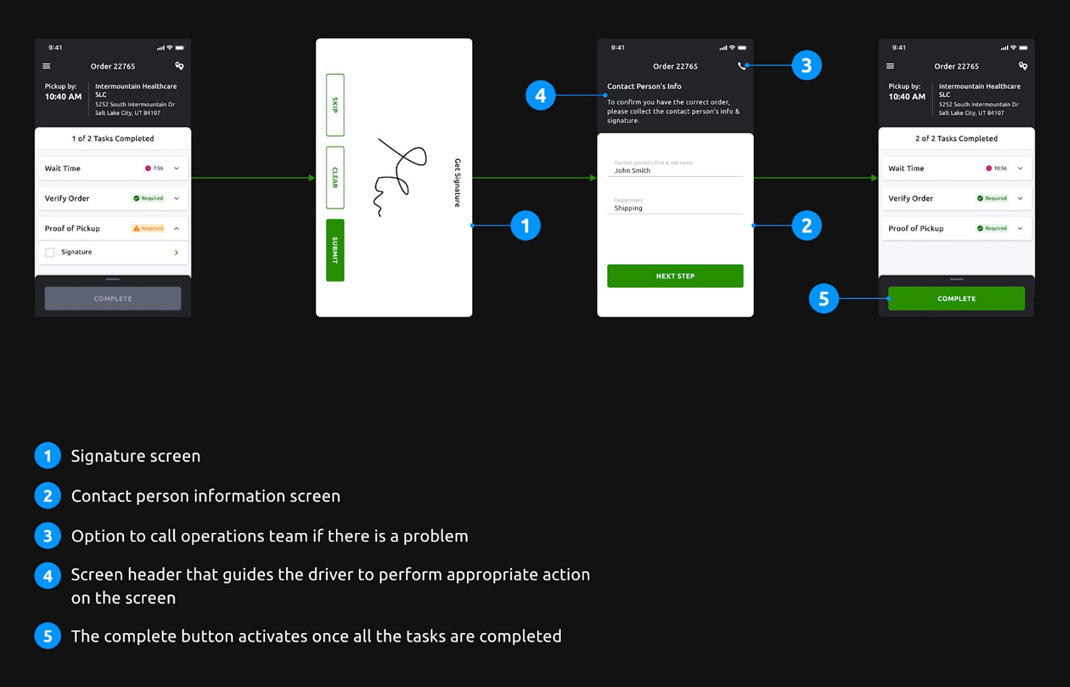
Proof of pick-up
- This flow will help the drivers to collect the customer’s signature, name, and department before completing the pick-up process.
RESULTS
Impact
The app was released in the last week of April 2022 with automated tasks.
Increased usability
With this update, over four months the operations team has noticed a significant decrease in calls by 56.2% from drivers working on an order. It has also created a better parity between the internal platform and the Driver Partner App, due to which we introduced more automated tasks for drivers in the app.
Increased driver confidence
The new update added more order-related details to the app that our drivers have appreciated. We have talked to many drivers about the latest update, and we learned that they feel more confident with what they do with the app than before.
Big win for operations team and Airspace
We sent out a SUS survey to our drivers in mid-April to evaluate the usability score of the old version of the app. In the first week of August, we sent out another SUS survey to assess the new app’s usability score and saw an approximate increase of 20% in the usability score.
CONCLUSION
How we measured success?
- Reduced number of calls between drivers and operations team(Airspace).
- Improved usability of the app.
- Increased NPS for drivers using the new Driver Partner app.
- Increased ease of adding a new and more complex task to the existing app structure.